 Schema Software
Audit log
The Audit log is the evidence trail — an append-only record of every scan, access check, review, and applied change, with who did it and when. Filter it to answer a specific question, then export exactly that set. It's also where you can undo any change the app applied.
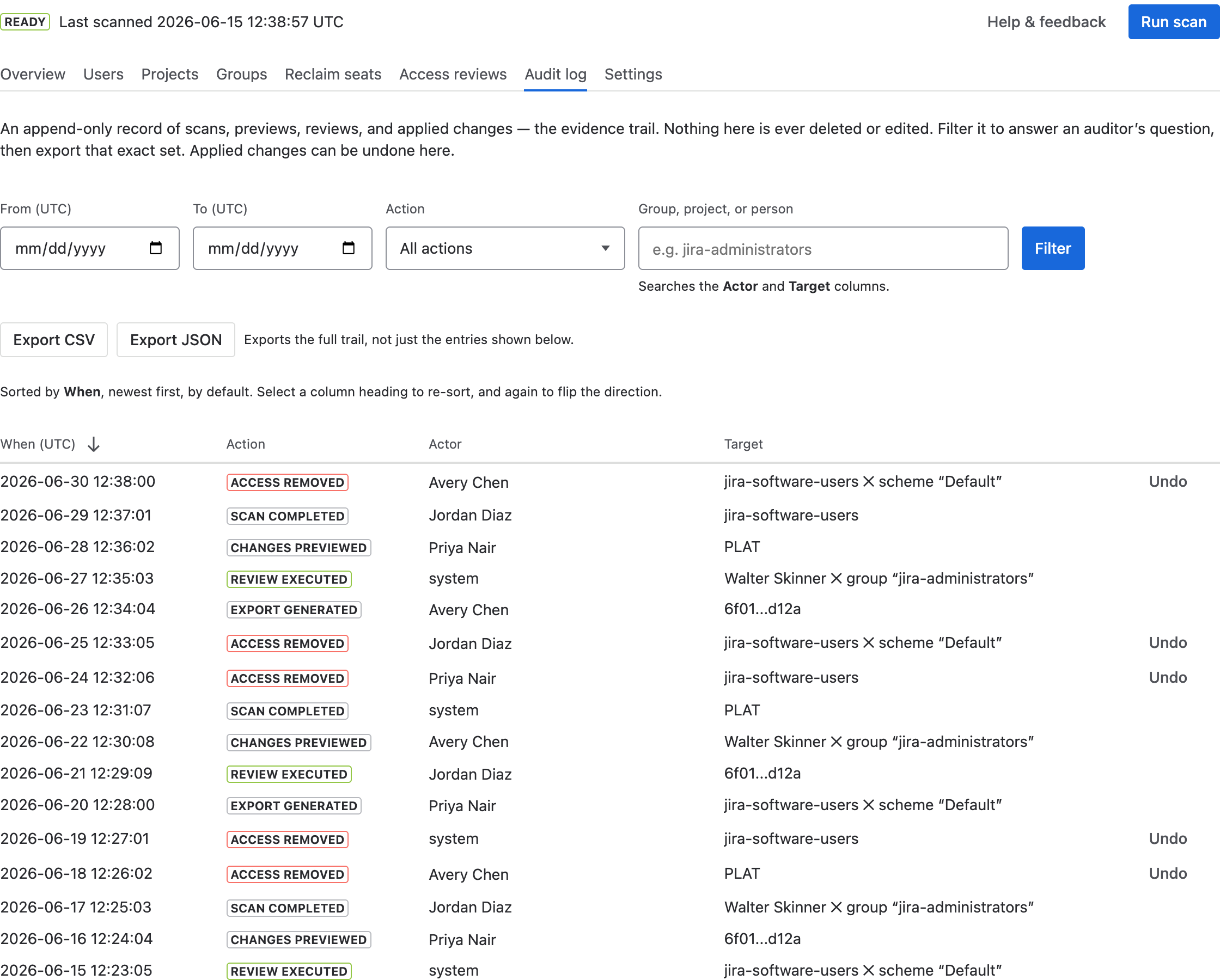
How to use it
- Browse recent activity — it's sorted by When, newest first. Select a column heading to re-sort, and again to flip the direction.
- Narrow it with the filters above the table: a date range, a single action, or free text matching a group, project, or person. Select Filter to apply and Clear to go back to the whole trail.
- To reverse a change, find its Access removed entry and select Undo. The undo takes effect in Jira immediately and is itself recorded.
- Select Export CSV or Export JSON to save the trail for compliance records. The export covers whatever the filters are showing — so filtering first is how you produce, say, one quarter's access changes on their own.
Answering an auditor's question
The two questions auditors ask most map onto the filters directly:
- “Show me every access change in Q2.” Set the date range, set Action to Access removed, then export.
- “Show me everything that touched this group.” Type the group name into the free-text box, leave the dates empty, then export.
Reading the log
- When (UTC) — the timestamp of the action.
- Action — what happened: scans started/completed, access checks, previews, reviews, and applied or undone changes.
- Actor — the administrator who triggered it, by name (or “system” for scheduled scans and other automatic activity). Hover a name to see the underlying Atlassian account ID; the export carries both, so an entry stays traceable even after someone is renamed or deactivated.
- Target — what was scanned or changed (a project, group, user, or review).
The log is append-only: entries are never edited or deleted, so it stands as a faithful record. Combined with the per-review exports from Access reviews, it's the evidence you'd hand to an auditor.
How long entries are kept
For as long as the app is installed. The audit log has no expiry and is never trimmed, rotated, or aged out — not after a month, not after a year, and not when a new scan runs. A governance tool that quietly discarded its own evidence would be worse than useless, so this one doesn't. Older entries stay exactly as written.
The log is deleted in only two circumstances, both of which are yours to trigger: when the app is uninstalled, which purges all of the app's stored data, and on a written deletion request. Both are described in the Privacy Policy and the DPA. If you are planning to uninstall and want to keep the trail, export it first.
One practical limit worth knowing: a single export returns up to 10,000 entries. If more than that match, the app says so on screen and tells you how many matched, so a partial export can never be mistaken for a complete one. Narrow the date range and export in slices to cover a longer history.